
 SmsZip
Instructions
SmsZip
Instructions
1.3 Mail‑to‑Attachment Conversion
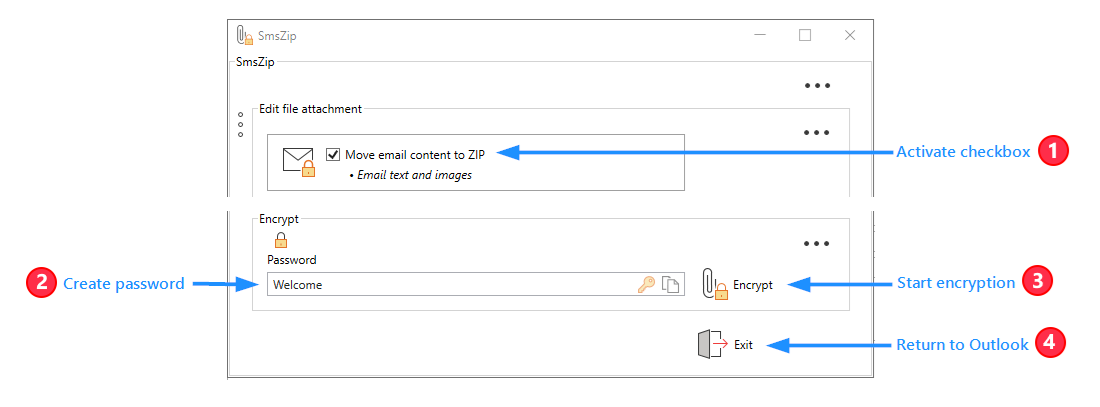
2.5 Mail‑to‑Attachment Conversion
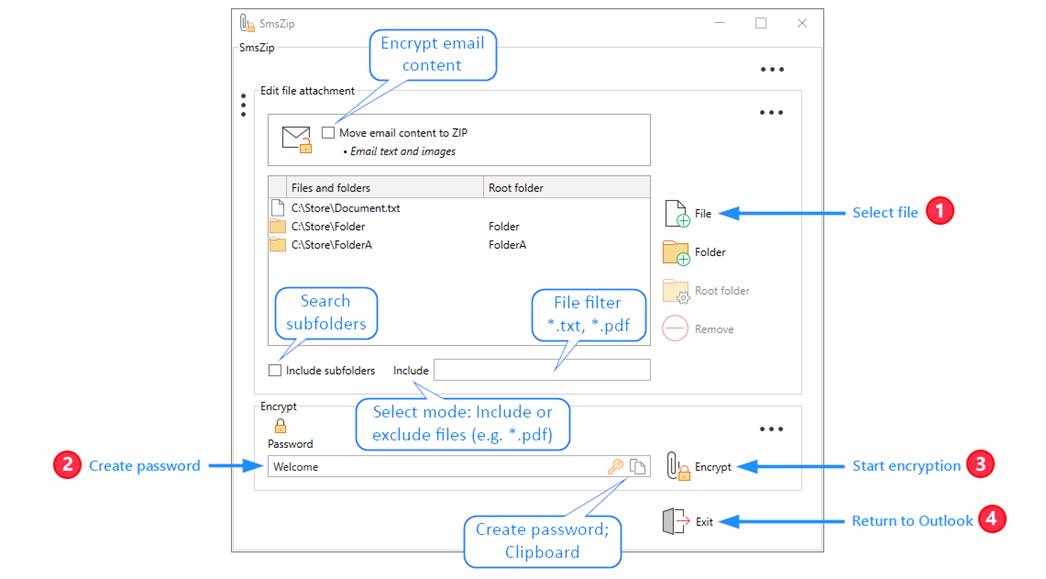
2.7.2 Compress file attachment
2.7.3.1 Generate Password Automatically
2.7.3.2 Copy Password to Clipboard
3.2.5 Move email content to ZIP
3.4.2 SMS provider information section
3.4.3.4 International dialing code
6.3.1 Error message for insufficient balance
6.3.1.1 Analyze status message
6.3.2.3 Setting up post command
1 Description
1.1 Structure
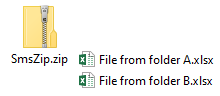
● Bundle and organize files
1.2 Encrypt

● Protect archives with a password – Cc recipients with their own password
1.3 Mail‑to‑Attachment Conversion
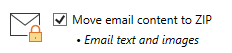
● Move email content as HTML into the file attachment
1.4 Send SMS

● Send password via SMS
2 Instructions
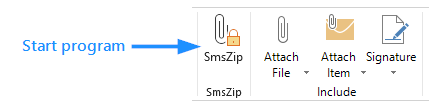
2.1 Start program
2.2 Open settings

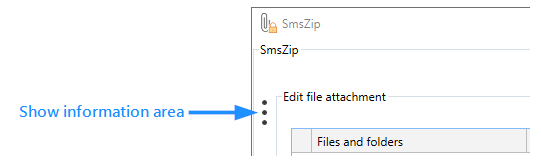
2.3 Show information area
2.4 Encrypt file attachment
2.5 Mail‑to‑Attachment Conversion
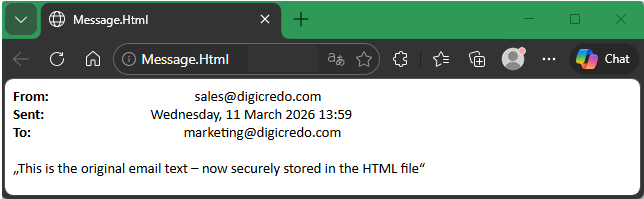
● The original content of the email has been moved to a separate file.
● File: Message.html
● Location: Outlook file attachment
2.6 Return to Outlook
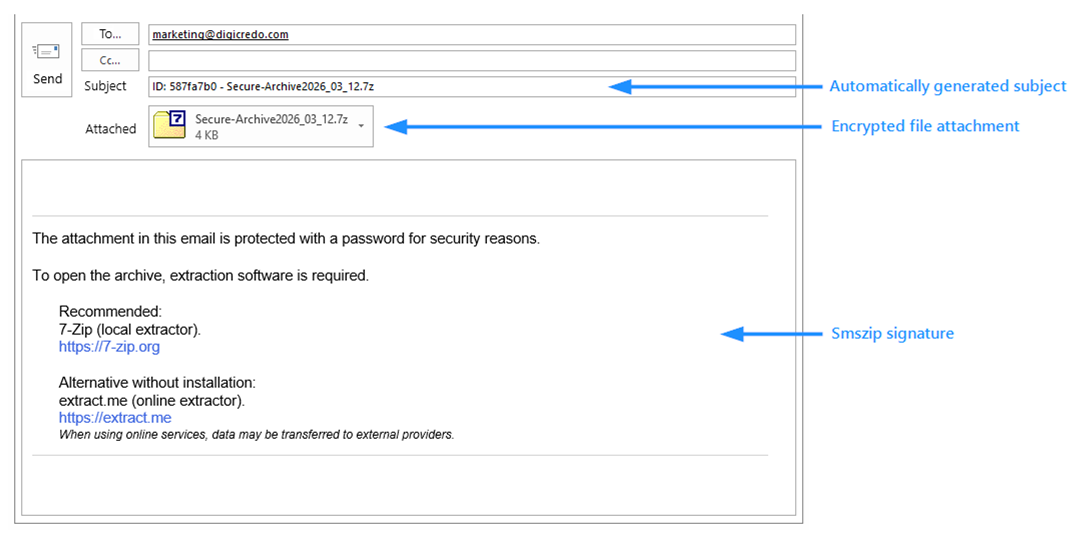
● Subject, SMSZip signature, and attachment name can be customized individually
● Available keywords
● %passwordid%
● %attachmentname%
● %mobilesendt%
● %mobilemiss%
2.7 Password Input Area
2.7.1 Encrypt file attachment
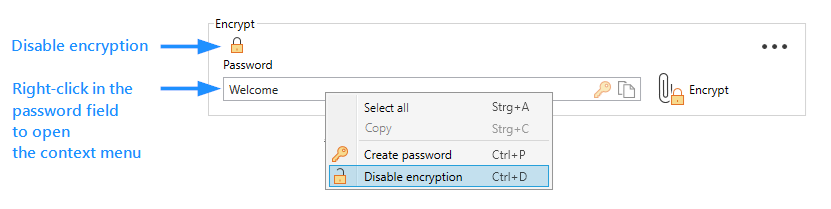
2.7.2 Compress file attachment

2.7.3 Icons and Shortcuts
2.7.3.1 Generate Password Automatically

● This icon is only available if the “Uniform Password” option is turned off
2.7.3.2 Copy Password to Clipboard

● This icon is only available if the “Send SMS” option is turned off
2.8 Customize root folder
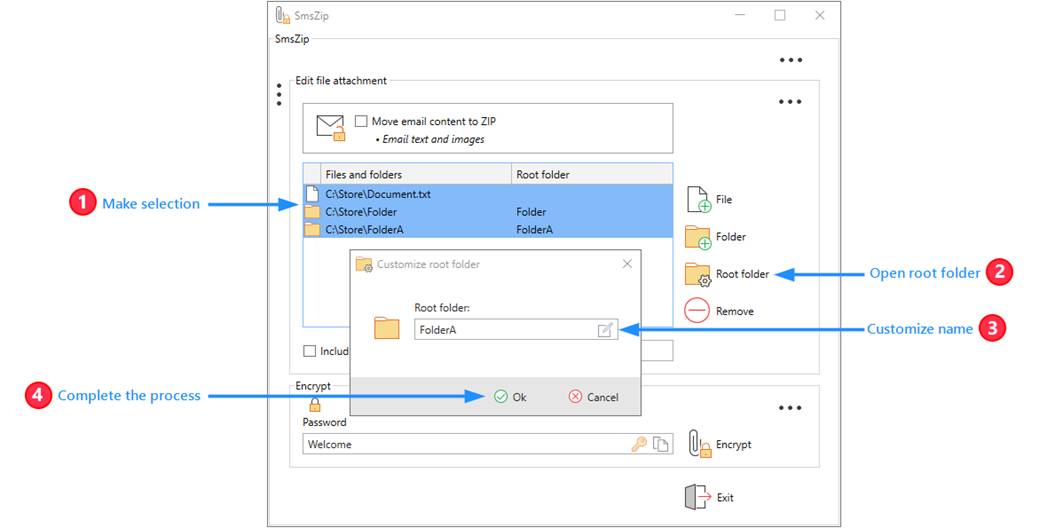
● The root folder is the folder in which the selected object is located
● C:\Folder\Subfolder\Root folder\File.txt
● C:\Folder\Subfolder\Root folder\Subfolder
● Files and folders from different paths can be stored in a shared folder, which can be assigned an individual name
● Objects with the same name are supplemented with numbered brackets
● File (2).txt
● Subfolder (2)
2.9 Send SMS
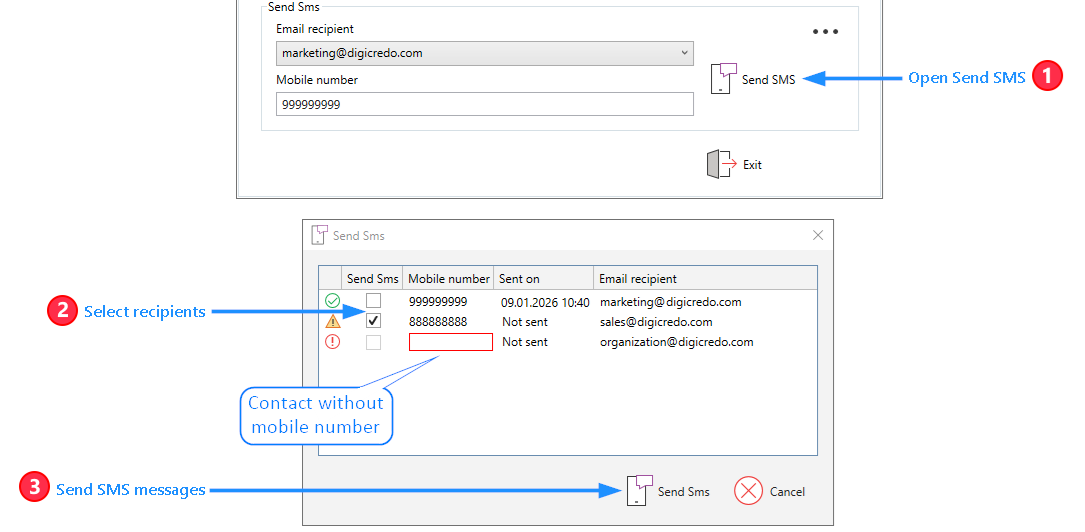
● When the program is closed, the SMS window will automatically appear
● If a password has been created
● If a password has been changed
● If a password has already been sent, the contact will not be preselected
● If a contact does not contain a mobile number, an error is displayed
2.10 Activate license
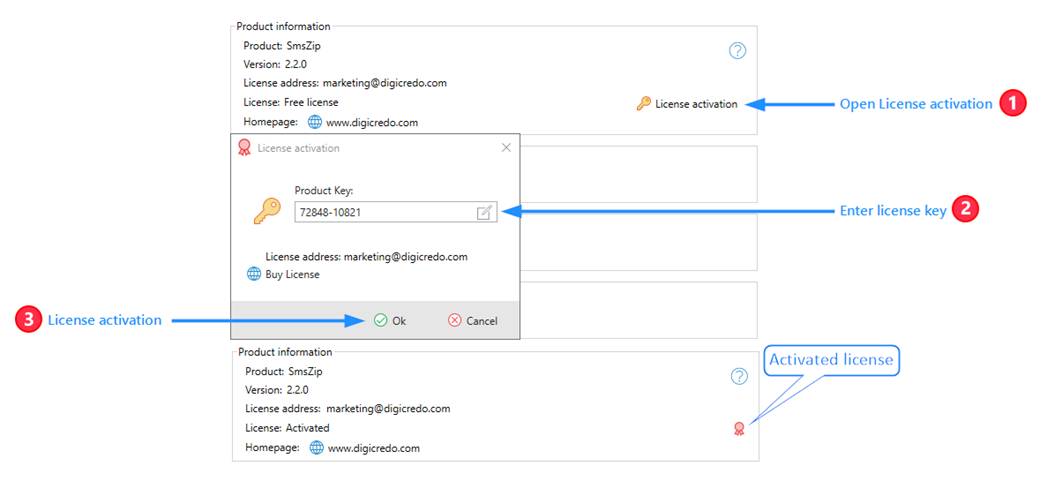
2.10.1 Request license key
● Click on "Buy License"
● Select Single User or Domain
● Copy the license key to the clipboard
2.10.2 Free license
● The free license can be used commercially and privately
● All program functions are activated except the SMS function
3 Settings
3.1 Basic settings
3.1.1 Product information
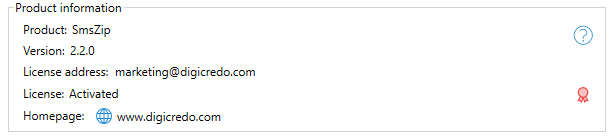
● Product version
● License address
3.1.2 Dark design

● Switches to a dark display
3.1.3 Exit program

● Confirmation is required to exit the program
3.1.4 Advanced settings


● Activates the advanced settings
● The settings icon is displayed in the respective program parts
● The advanced basic setting is displayed
3.1.5 Update

● When the program starts, it checks for an update
3.1.6 Send SMS

● Enables the feature to send SMS messages
● A licensed version is required for this
3.1.7 Save connection data
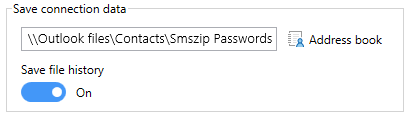
● The passwords are stored in a separate address book in the corresponding contact
● If the path is set to the standard address book, the data is saved in the main contact
● The file history is saved in the respective contact
3.1.8 Subject
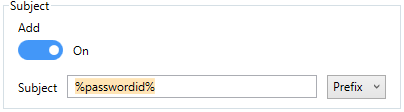
● The generated text is added to the email subject
● Prefix inserts the text before the existing subject
● Suffix appends the text to the existing subject
● The keywords can be called up with the right mouse button
● %passwordid%
● %attachmentname%
● %mobilesendt%
● %mobilemiss%
3.1.9 SmsZip signature
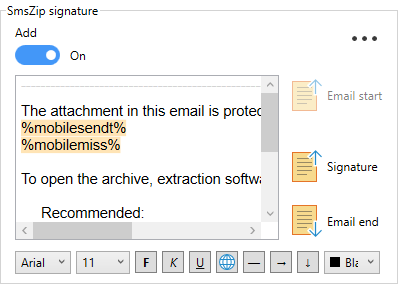


● The SmsZip signature is placed at the beginning or end of the email
● The SmsZip signature can be positioned before or after an email signature
● With the text editor, the SmsZip signature will be created
● The keywords can be called up with the right mouse button
● %passwordid%
● %attachmentname%
● %mobilesendt%
● %mobilemiss%
|
|
|
|
|
|
|
|
|
|
|
|
|
Font |
Font size |
Bold |
Italic |
Underlined |
Hyperlink |
Line |
Indent |
Spacing |
Color Assignment |
Full Screen Mode |


3.1.9.1 Restore default text
● Select and delete all text in the field
● Close the program
● The default text will be automatically restored upon the next start
3.2 File attachment
3.2.1 Folder structure
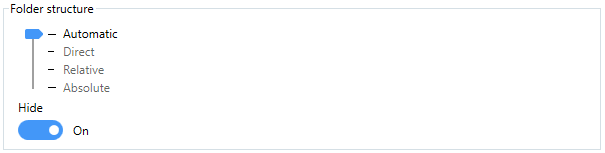
3.2.1.1 Hide
● The folder structure and file names cannot be viewed in an encrypted file attachment
● Requires 7-Zip
● In encrypted Zip and Zipx files, the folder structure and file names are readable without a password
3.2.1.2 Automatic
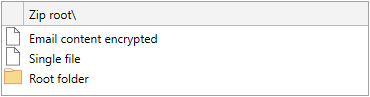
3.2.1.3 Relative
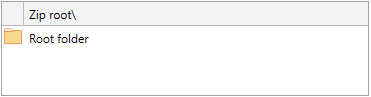
3.2.1.4 Direct
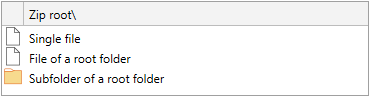
3.2.1.5 Absolute
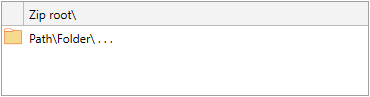
3.2.2 Filter settings
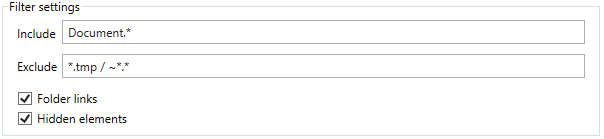
● The settings determine which files from the folders and subfolders are included in the file archive
● Include
● Only files that begin with the name Document are included
● document. Docx
● Exclude
● Files beginning with a tilde are excluded
● ~$ocument.docx
● Files with the extension .tmp are excluded
● document.tmp
● Folder links
● Linked folders are excluded (junctions)
● Hidden elements
● Hidden folders are excluded
● Hidden files are excluded
● Linked files
● The linked file is not added, only the link itself is included in the file archive
3.2.3 Compression

● Affects the ratio between compression and computing time
3.2.4 Start folder

● Sets the starting folder for file selection
3.2.5 Move email content to ZIP

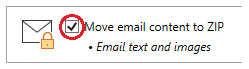
3.2.5.1 Default setting
● The checkbox for encrypting email content is automatically set
3.2.5.2 Email signature
● The email signature can be placed in both the encrypted and the original file
3.2.5.3 File format
● The encrypted email content is stored in a file
● Folder --> Message
● Msg --> Message.msg
● Html -->Message.html
● The subfolder Message-Files is being created
Registry-Path: Computer\HKEY_LOCAL_MACHINE\SOFTWARE\WOW6432Node\digicredo\SmsZip\Clients
|
Registry-Key |
Value |
Description |
|
MailEncryptName |
Message |
Sets the name of the file in which the email content will be saved |
3.3 Encrypt
3.3.1 File format

|
File format |
Compression method |
Compression ratio |
Encryption |
Security |
Folder structure |
|
Zip |
Deflate |
4.8 |
ZipCrypto |
Vulnerable |
Visible |
|
Zipx |
LZMA |
11.7 |
AES256 |
Secure |
Visible |
|
7-Zip |
LZMA2 |
12.6 |
AES256 |
Secure |
Hidden |
3.3.2 File attachment

● Generates the name of the file archive
● Date sortable; Time
● Secure-Archive_2025_03_14-17_04.Zip
● Date country setting; Prefix
● 03_14_2025_Secure-Archive.Zip
● Password-ID
● Secure-Archive_ID_bbe9ec65.Zip
● The name of the file attachment is assigned to the keyword %attachmentname%
Registry-Path: Computer\HKEY_LOCAL_MACHINE\SOFTWARE\WOW6432Node\digicredo\SmsZip\Clients
|
Registry-Key |
Value |
Description |
|
PasswordIdPrefixFile |
ID_ |
Value + password ID in the name of the file attachment ID_fc0d9e02 |
|
PasswordIdPrefixMail |
ID: |
Value + password ID in the keyword %PasswordId% ID: fc0d9e02 |
|
PasswordIdPrefixMailCc |
CcID: |
Value + (Cc- password ID) in the keyword %PasswordId% ID: fc0d9e02 (CcID: 82a42b7f) |
3.3.3 Password policy
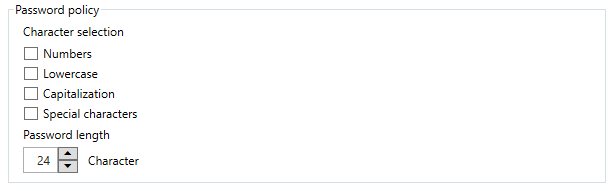
● Password entry is monitored by this policy
● If an option is enabled, it must be included in the password
● If an option is not activated, it may appear in the password
● The password length must be at least the specified length
|
Registry-Key |
Value |
Description |
|
PasswordPolicyStrict |
True |
True: |
|
PasswordSpecialCharacters |
!@%*<>()?+-= |
Allowed special characters |
3.3.4 Password field


● The password entry is obscured
3.3.5 Password input
3.3.5.1 Uniform

● All recipients receive the same password
● A unique password ID is generated
3.3.5.2 Automatic

● The password is generated based on the password policy
● A unique password ID is generated
● Replace password
● A new password is generated at each start
● Except when an SMS has been sent, but the email has not yet been sent
3.3.6 Recipient list

● If necessary, a recipient list in the form of a text file named Recipients.txt will be added as an file attachment
Registry-Path: Computer\HKEY_LOCAL_MACHINE\SOFTWARE\WOW6432Node\digicredo\SmsZip\Clients
|
Registry-Key |
Value |
Description |
|
AttachmentRecipientsListName |
Recipients.Txt |
Specifies the name of the file in which the recipient list is saved as a file attachment |
3.4 Send SMS
3.4.1 SMS provider
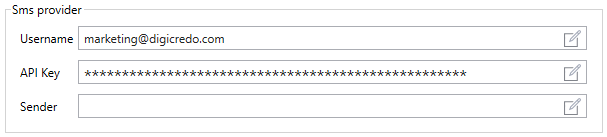

● Paste from the clipboard
3.4.1.1 Username
● Username assigned by the SMS provider
● The username is not required by all SMS providers
3.4.1.2 API Key
● The API key assigned by the SMS provider
3.4.1.3 Sender
● The sender of the SMS messages
● The specification of a sender depends on the SMS provider
3.4.2 SMS provider information section
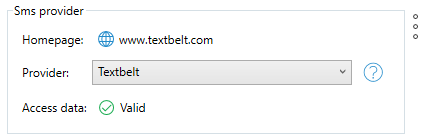
3.4.2.1 Homepage
● The homepage of the SMS provider
● Recharge credit
● Check transmission history
3.4.2.2 Provider

● Selection of the preinstalled SMS providers
● Quick instructions for setting up each provider
3.4.2.3 Access data
● Shows the validity of the access data
● Access data
● SmsUrl
● Username
● If a username is required
● API Key
3.4.3 Sms settings
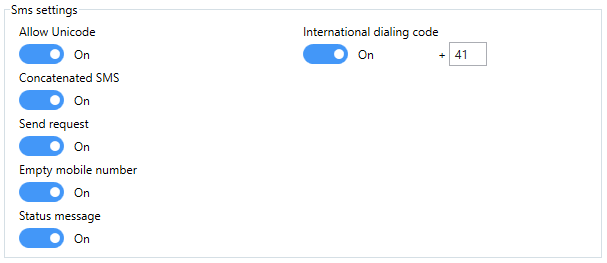
3.4.3.1 Allow Unicode
● Allows sending an SMS message with Unicode characters
● An SMS message consists of a maximum of 160 characters
● An SMS message with Unicode consists of a maximum of 70 characters
3.4.3.2 Concatenated SMS
● Sends a message that must be split into several SMS messages
● If the option is disabled
● It will ask whether the message should be sent
● If the Reg-Key HideSmsConfig is set to True, sending is not allowed
3.4.3.3 Send request
● When the program is closed, the SMS window will automatically displayed
● If a password has been created
● If a password has been changed
3.4.3.4 International dialing code
● The mobile number will be adjusted to the international dialing code for the mobile network
● 00xx xx xxx xx xx
● +xx xx xxx xx xx
● 0xx xxx xx xx
● +41xx xxx xx xx
3.4.3.5 Empty mobile number
● An email recipient without a mobile number will not be listed
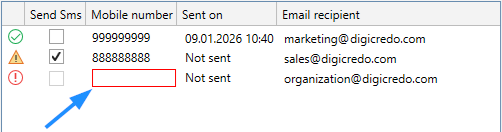
3.4.3.6 Status message
● The status message from the provider is displayed for each SMS message
3.4.4 SMS message
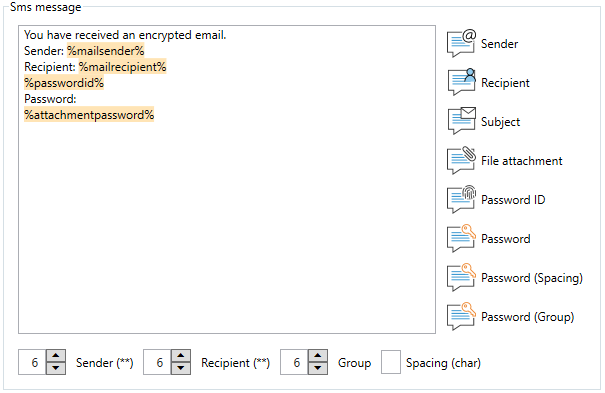
● With the text editor, the SMS message will be created
● (**) The email addresses are masked and reduced to the assigned length
● marketing@digicredo.com
● market**@**do.com
● (char) This value is inserted between the individual password characters or the password grouping
● S e c r e t f o l d e r
● S-e-c-r-e-t-f-o-l-d-e-r
● Secret folder
● Secret-folder
3.4.4.1 Restore default text
● Select and delete all text in the field
● Close the program
● The default text will be automatically restored upon the next start
3.4.5 SMS keywords

● The SMS keywords are used in the email subject or in the SmsZip signature
● The text will be inserted once
● *SMS-Sent
● When an SMS has been sent
● *No-mobile-number
● If a password has been created or changed and no mobile number is available
4 Keywords
● •The keywords are used to pass values to
● SmsZip signature
● Email subject
● SMS message
● %passwordid%
● The password ID assigned to the password
● ID: fc0d9e02
● A Cc recipient will have their own password ID added in brackets
● ID: fc0d9e02 (CcID: 82a42b7f)
● %attachmentname%
● The name of the file attachment
● The display can be changed in the file attachment settings
● %mobilesendt%
● An SMS message has been sent
● The text can be changed in the settings of sending SMS
● %mobilemiss%
● No mobile number was found
● The text can be changed in the Send SMS settings
Registry-Path: Computer\HKEY_LOCAL_MACHINE\SOFTWARE\WOW6432Node\digicredo\SmsZip\Clients
|
Registry-Key |
Value |
Description |
|
PasswordIdPrefixFile |
ID_ |
Value + password ID in the name of the file attachment ID_fc0d9e02 |
|
PasswordIdPrefixMail |
ID: |
Value + password ID in the keyword %PasswordId% ID: fc0d9e02 |
|
PasswordIdPrefixMailCc |
CcID: |
Value + (Cc- password ID) in the keyword %PasswordId% ID: fc0d9e02 (CcID: 82a42b7f) |
5 Password ID
● A random password ID is generated during password creation
● The password ID is not reproducible
● The password ID is used to identify the password
● The password ID consists of letters and numbers
Registry-Path: Computer\HKEY_LOCAL_MACHINE\SOFTWARE\WOW6432Node\digicredo\SmsZip\Clients
|
Registry-Key |
Value |
Description |
|
PasswordIdLenght |
8 |
Specifies the length of the password ID; Minimum 4 characters |
|
PasswordIdNumeric |
False |
The password ID is generated from numbers only ID: fc0d9e02 --> ID: 48195411 |
6 Registry
6.1 Paths
6.1.1 Users
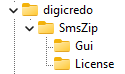
Computer\HKEY_CURRENT_USER\SOFTWARE\digicredo\SmsZip
6.1.2 Install
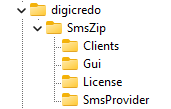
Computer\HKEY_LOCAL_MACHINE\SOFTWARE\WOW6432Node\digicredo\SmsZip
6.1.3 Central configuration
 Computer\HKEY_LOCAL_MACHINE\SOFTWARE\Microsoft\Office\ClickToRun\REGISTRY\MACHINE\Software\Wow6432Node\digicredo\SmsZip\GuiPolicy
● All user accounts load these settings
● License
● Api key that was entered via the administrator account
● CentralApiKey=True
● Domain license that was activated via the administrator account
● GuiPolicy
● The values of the administrator account user interface
● CentralConfiguration=True
6.2 Clients
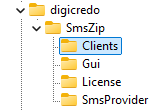
Computer\HKEY_LOCAL_MACHINE\SOFTWARE\WOW6432Node\digicredo\SmsZip\Clients
● All user accounts load these settings
● The Hide- and Deny-keys have no effect on the administrator account
|
Registry-Key |
Value |
Description |
|
AdressbookInitalName |
SmsZip Passwords |
The passwords of the recipients are stored in this address book |
|
AdressBookPublicPath |
|
The passwords are stored in the address book of a public folder //Path |
|
AttachmentRecipientsListName |
Recipients.Txt |
Specifies the name of the file in which the recipient list is saved as a file attachment |
|
CentralApiKey |
True |
All users have the same API key The input field is locked |
|
CentralConfiguration |
False |
The startup settings of the user
accounts are based on the Registry-Path |
|
DenyChangeApiKey |
True |
The individual API key cannot be changed by the user The input field is locked |
|
DenyChangeZipPassword |
True |
The user can create a password, but not change it |
|
HideAttConfig |
True |
Hide settings: Edit file attachment |
|
HideEncryptionDisable |
True |
Hide icon and context menu in password field: Disable encryption |
|
HideMainConfig |
True |
Hide settings: Main setting |
|
HideMainSubConfig |
True |
Hide Settings: Extensions to the main setting |
|
HideMenuInf |
True |
Hide information area |
|
Registry-Key |
Value |
Description |
|
HideSmsConfig |
True |
Hide settings: Send Sms |
|
HideZipConfig |
True |
Hide settings: Encrypt |
|
MailEncryptName |
Message |
Sets the name of the file in which the email content will be saved |
|
PasswordIdLenght |
8 |
Specifies the length of the password
ID |
|
PasswordIdNumeric |
True |
The password ID is generated from numbers only ID: fc0d9e02 --> ID: 48195411 |
|
PasswordIdPrefixFile |
ID_ |
Value + password ID in the name of the file attachment ID_fc0d9e02 |
|
PasswordIdPrefixMail |
ID: |
Value + password ID in the keyword %PasswordId% ID: fc0d9e02 |
|
PasswordIdPrefixMailCc |
CcID: |
Value + (Cc- password ID) in the keyword %PasswordId% ID: fc0d9e02 (CcID: 82a42b7f) |
|
PasswordPolicyStrict |
True |
True: |
|
PasswordSpecialCharacters |
!@%*<>()?+-= |
The allowed special characters |
|
SearchMobileNumberAdressbookPublicPath |
|
The mobile number is searched in the address book of a public folder //Path |
|
SearchMobileNumberOnAdressbookLocal |
True |
The mobile number is being searched for in the personal address book |
|
SearchMobileNumberOnAdressbookSubFolder |
True |
The mobile number is also searched in the subfolders |
6.3 SmsProvider

Computer\HKEY_LOCAL_MACHINE\SOFTWARE\WOW6432Node\digicredo\SmsZip\SmsProvider
|
Registry-Key |
Value |
Description |
|
EnableUrlencoded |
True |
Enabled: application/x-www-form-urlencoded |
|
EnableUserName |
True |
The username is required to log in |
|
Homepage |
https://www.exampleprov.com |
The homepage of the SMS provider |
|
ResponseAsError |
RESTRICTED URL;INSUFFICIENT_CREDIT |
Raise an error if this
value appears in the status message |
|
SmsPost |
body:%message%,to:%to%,from:%from% |
The Provider API
command * |
|
SmsUrl |
https://api.exampleprov.com/Accounts/%username%/Messages.json |
The URL of the API command |
* Note capitalization and quotation marks
6.3.1 Error message for insufficient balance
● Not all providers generate an error message if the SMS was not sent due to insufficient credit
6.3.1.1 Analyze status message
● Start the program
● Open SMS settings
● Activate status message
● Send an SMS message
● After sending, the status message appears
● Look for the passage that indicates the insufficient balance
6.3.1.2 Enter keyword
● Edit Registry Key
● ResponseAsError
● Enter the text passage found that indicates the insufficient balance
6.3.2 Custom SMS provider
6.3.2.1 Setting up URL
● SmsUrl
● Copy the URL from the API documentation of the SMS provider
● The username may be required in the URL
● The keyword %username% is used for this
● https://api.exampleprov.com/Accounts/%username%/Messages.json
● EnableUserName
● If a user name is required for authentication, the value is set to True
● For SMS providers that only need the API key, the value is set to False
● This will deactivate the Username input field
6.3.2.2 Test connection
● Start the program and call up SMS settings
● Set provider to Custom
● Enter the access data
● Username
● API Key
● If all values are correct, the access data is displayed as valid
● In case of an error, a further error message will be displayed
6.3.2.3 Setting up post command
● SmsPost
● Copy the post command from the SMS provider API documentation
● Replace the transfer value of the provider keyword for the message with %message%
● Replace the transfer value of the provider keyword for the recipient with %to%
● Replace the transfer value of the provider keyword for the sender with %from%
● Body=%message%&To=%to%&From=%from%
● EnableUrlencoded
● The setting for this registry key needs to be evaluated
● If this value is incorrect, a misleading error message may occur
6.3.2.4 Test sending
● Start the program and send an SMS message
● In case of failure
● Change the value of EnableUrlencoded
6.3.3 SMS provider settings
6.3.3.1 www.textbelt.com
|
Registry-Key |
Wert |
Beschreibung |
|
EnableUrlencoded |
True |
|
|
EnableUserName |
False |
|
|
Homepage |
https://www.textbelt.com |
|
|
ResponseAsError |
success: false |
|
|
SmsPost |
phone=%to%&message=%message%&key=%apikey% |
|
|
SmsUr |
https://textbelt.com/text |
|
6.3.3.2 www.clicksend.com
|
Registry-Key |
Wert |
Beschreibung |
|
EnableUrlencoded |
False |
|
|
EnableUserName |
True |
|
|
Homepage |
https://www.clicksend.com |
|
|
ResponseAsError |
Read chapter: 6.3.1 Error message for insufficient balance |
|
|
SmsPost |
{"messages":[{"body":"%message%","to":"%to%","from":"%from%"}]} |
|
|
SmsUrl |
https://rest.clicksend.com/v3/sms/send |
|
6.3.3.3 www.bulksms.com
|
Registry-Key |
Wert |
Beschreibung |
|
EnableUrlencoded |
False |
|
|
EnableUserName |
False |
|
|
Homepage |
https://www.bulksms.com |
|
|
ResponseAsError |
|
|
|
SmsPost |
{"from":"%from%","to":"%to%","body":"%message%"} |
|
|
SmsUr |
https://api.bulksms.com/v1/messages |
|
6.3.3.4 www.twilio.com
|
Registry-Key |
Wert |
Beschreibung |
|
EnableUrlencoded |
True |
|
|
EnableUserName |
True |
|
|
Homepage |
https://www.twilio.com |
|
|
ResponseAsError |
|
|
|
SmsPost |
Body=%message%&To=%to%&From=%from% |
|
|
SmsUr |
https://api.twilio.com/2010-04-01/Accounts/%username%/Messages.json |
|
6.3.3.5 www.clickatell.com
|
Registry-Key |
Wert |
Beschreibung |
|
EnableUrlencoded |
True |
|
|
EnableUserName |
False |
|
|
Homepage |
https://www.clickatell.com |
|
|
ResponseAsError |
|
|
|
SmsPost |
content=%message%&to=%to%&from=%from% |
|
|
SmsUrl |
https://platform.clickatell.com/messages |
|
7 Set up SMS provider
8 Document Information
Version: 1.0 (April 2026)
Software: SmsZip v2.2
Publisher: digicredo GmbH
Website: www.digicredo.com